
A slow, broken, or confusing website doesn’t just annoy visitors but also becomes a big concern for website owners, too. And so, they end up wondering what went wrong, where, and how to fix it.
Table of Contents
ToggleIn this situation, many people start believing that their content has optimization issues. Or, maybe the infrastructure has a problem.
But what they don’t realize is that rankings go beyond optimizing content; they mainly depend on whether search engines can access and understand that content in the first place.
See, if Google can’t find your pages, it can’t index them. And if they aren’t indexed, they won’t rank. Without rankings, organic traffic becomes much harder to earn, no matter how great your content is.
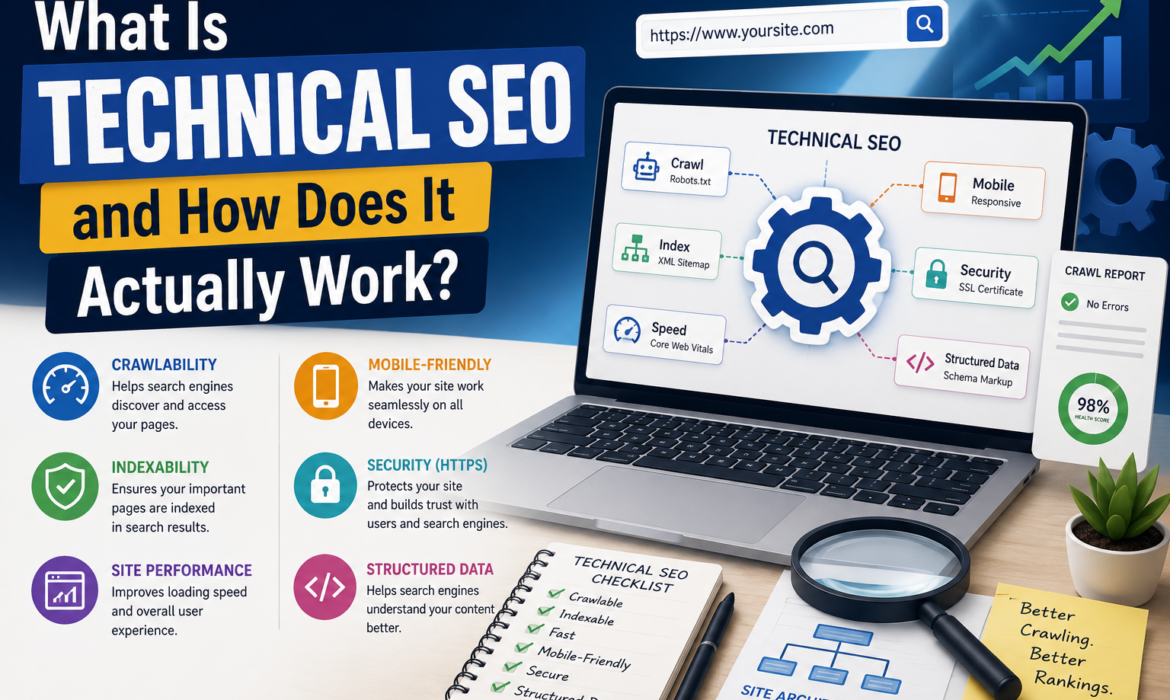
So in the end, it’s all about how good you are at technical SEO. Here’s your chance to know about what is Technical SEO, its core elements, and how you can make it work for you!
What Is Technical SEO?
Technical SEO is the process of optimizing a website’s technical foundation so search engines can crawl, index, and understand its pages efficiently.
Your pages must be made accessible to search engines. A site with broken links, indexing issues, and slow loading times, and one that Googlebot cannot crawl properly, can stop even the most high-quality content from showing up in search results.
This type of SEO focuses on improving these behind-the-scenes elements to help search engines access, crawl, and understand your content more efficiently.
However, it’s a single part of an SEO strategy. To understand the basics, let’s compare it with the other main types of SEO.
SEO Type | Main Focus | Example Activities |
Technical SEO | Site overall performance, crawlability, and indexability | Page speed optimization, XML sitemap, fixing crawl errors, schema markup |
On-Page SEO | Relevance of content and optimization | Keyword research, headings, meta tags, and internal linking |
Off-Page SEO | Build authority and trust signals | Brand mentions, link building, digital PR |
Why Does Technical SEO Matter?
Let’s understand it with an example. Suppose your website is a library. It contains many valuable books; readers struggle to find them because the shelves are disorganized. The labels are missing, or some sections are locked.
Similarly, technical SEO helps organize your website so search engines can navigate it efficiently.
Google prefers fast-loading websites with no broken links and organized navigation. Technical problems not only frustrate users but also signal to Google a low-quality user experience. Search engines are more likely to crawl and index pages that are technically optimized.
If your site contains well-optimized content, it performs better when search engines do not face any difficulty in crawling, and backlinks become more valuable when they point to pages that are accessible and properly indexed.
How Does Technical SEO Actually Work?
Technical SEO is the backend process that allows search engines to find, read, understand, and trust your website. Here’s how it works step by step.
Step #1: Search Engines Discover the Page
A page cannot rank if search engines cannot discover it. Crawlers typically find pages through internal links, XML sitemaps, or links from other websites. These signals act like directions that lead search engines to new content.
For example, if you publish a blog as an orphaned page, search engines may take longer to find it. Conversely, a good internal link structure enables crawlers to quickly find important pages.
Key elements:
- Internal links
- XML sitemaps
- Search engine crawlers
Step #2: Search Engines Crawl the Content
Once your web page is discovered, search engine bots crawl it and read its content. During this process, crawlers go through the page’s code, text, images, and links to comprehend what information is available.
However, search engines have limited resources. They allocate a crawl budget, which refers to the number of pages Google is willing to crawl on your website within a given period.
Key elements:
- Crawl budget
- Robots.txt
- Crawl errors
- Redirects
Step #3: Search Engines Interpret What the Page Is About
In this stage, the search engine tries to understand the content of your page to see what service you are actually providing. It reads your title, looks at the meta description, and checks the hierarchy of your content. If you have added a schema to the page, it is very useful for explaining it to Google.
You can also understand this with an example. Suppose you are reading a book. The book has a clear title, it has chapters, and its structure is well organized. That is why the book is easy to read, and the things written in it are understandable. A website works the same way. Its title, description, and pages help users and Google decide what information is contained in it.
Key elements:
- HTML structure
- Heading tags
- Meta information
- Schema markup
Step #4: Search Engines Decide Whether to Index the Page
Google evaluates content quality, relevance, accessibility, and duplication before deciding whether to index a page. After checking everything, if it’s satisfied, it indexes the page. And if a page isn’t indexed, it won’t appear in search results until you re-index it.
Key elements:
- Indexing
- Canonical tags
- Noindex directives
- Duplicate content
Step #5: Search Engines Evaluate Quality and User Experience
Many things besides content help Google make a decision. For example, the speed of the website. Google is less likely to rank a website that loads slowly. It also sees whether your internal linking is broken. Because in this way, instead of getting the desired information, the user’s trust decreases.
Google also checks whether your website is suitable for different screen sizes, especially mobile. Let’s say if the website opens correctly on the desktop, does it open correctly on the mobile as well?
A fast-loading, mobile-friendly, easy-to-navigate, and secure website is more likely to perform well than a slow site plagued by technical issues.
Key elements:
- Page speed
- Core Web Vitals
- Mobile friendliness
- HTTPS security
What Are the Core Elements of Technical SEO?
If you want to conduct a technical audit of your website, you should first know which elements make the website technically weak so that you can improve them correctly and get a better position in your website rankings.
Crawlability
Crawling means that Google comes to your website, looks at it, and examines its pages. If Google is unable to crawl your website, it means there is a problem. Either you have blocked it, or there is another technical error.
- Robots.txt
This is a simple text file that communicates with crawlers. This file contains a set of permissions that tell the bots which pages and blogs on the website to access and which not. You can access it by visiting “yourdomain.com/robots.txt.”
- XML Sitemap
A sitemap acts as a blueprint for search engines. It contains all the important content of your website, such as pages, videos, and files. It helps Google access these files quickly and enables bots to discover new pages and understand the overall structure of the website.
- Internal Linking
The purpose of internal linking is to link your content to relevant pages. This not only strengthens authority but also makes it easier for Google to understand the topic’s relevance.
Indexability
Indexability means that your content has been stored and cataloged in Google’s system or database. Two types of problems can arise at this stage:
- Canonical Tags
When your website has similar content or different pages on the same topic, one of them is chosen as the best and is declared the primary page or post.
The canonical tag is used for this purpose. It tells Google to ignore other similar pages and give priority to the page that has been declared the primary.
- Noindex Tags
The noindex tag is a Google blocking HTML code snippet. It instructs search engines not to index a page.
This is usually used when you want to create a page but do not want it to appear in Google search results.
Website Architecture
It is a structural framework of how web pages are connected, organized, and categorized. The clearer the structure, the easier it will be for Google and people to navigate.
- URL Structure
Well-structured URLs are concise, easy to read, and provide context about a page’s content. For example:
Good: example.com/technical-seo-guide
Poor: example.com/page?id=5487
- Navigation
Navigation is the system of menus, pages, and links that guide users to move through a site. A logical navigation structure offers a better user experience and various other SEO benefits.
Performance
Website performance is the process of how quickly and smoothly your website runs and how well it interacts with visitors across all devices.
- Core Web Vitals
Core Web Vitals are the standardized metrics used to measure the real-world user experience. They evaluate the loading speed, interactivity, and visual stability of a website.
Mobile Optimization
Most people use mobile devices to search for everything they need information on. You need to make sure your content is functionally fit for smaller screens.
- Responsive Design
Make sure your website’s design is responsive so the content automatically adjusts to different screen sizes and devices. This ensures every user can easily access and interact with content, whether they’re using a desktop, tablet, or smartphone.
Security
Website security means protecting your website from cyber threats, data breaches, and unauthorized access. It also helps protect user data and build trust. For example, HTTPS is an essential security measure to prevent these threats.
- HTTPS
HTTPS (Hypertext Transfer Protocol Secure) is an encrypted version of HTTP. It is used to send data between a website and a web browser. This reliable path not only protects users’ data but also signals trustworthiness to search engines.
Structured Data
Structured data is information that is written in a highly formatted, easy-to-read, and organized way. It is easily accessible by both users and search engines. Schema markup is an example of structured data.
- Schema Markup
Schema markup provides additional context about products, articles, reviews, FAQs, events, and other types of content. It can also improve how pages appear in search results by enabling rich results and enhanced search features.
Quick Summary of Common Technical SEO Problems
Finding technical SEO errors is only possible when you completely understand each one. Here is a quick summary of common technical problems that many websites face.
Problems | Possible Effects |
404 Errors | Poor user experience and crawl inefficiencies |
Slow Page Speed | Higher abandonment rates and weaker performance |
Content Redundancy | Confusion about which page should rank |
Orphan Pages | Pages become difficult to discover |
Redirect Chains | Slower crawling and diluted ranking signals |
Blocked Pages | Important content may not be crawled |
Incorrect Noindex Tags | Pages fail to appear in search results |
Canonical Errors | Duplicate indexing and ranking confusion |
Mobile Usability Issues | Poor experience on mobile devices |
Core Web Vitals Failures | Reduced user satisfaction |
Missing XML Sitemap | Slower content discovery |
Security Issues | Lower trust and potential visibility problems |
How to Perform a Technical SEO Audit?
It is the process of comprehensively evaluating a website’s infrastructure, backend settings, and code. Its main purpose is to make sure that search engines easily render, crawl, and index website pages.
This practice makes your site search visible. Once you understand how Google accesses and crawls your pages, you can easily sort out these issues.
A successful SEO audit typically follows this sequence:
Step 1. Check Your Indexing Status
You can check your indexed pages in two ways: with Google or using a command. The command is “site:”. For the first method, go to Google Search Console and add the URL in the inspection URL bar. If not found, you can request to index a page.
In the second method, simply go to Chrome and write “site: your domain name/URL” you want to check and search. If the result shows your pages, it means your page or site is indexed.
Step 2. Review Crawlability
After the indexing process, checking the crawlability status is essential. Screaming Frog Spider or Google Search Console are the most commonly used crawlers by SEO service providers.
These crawlers depend on technical signals to find the content. If the crawl is restricted, the pages may never reach the indexing stage.
Step 3. Site Structure
Try to keep your website’s structure clean and well-organized. It helps search engines and users to navigate easily. In this phase, evaluate navigation menus, URL structure, internal link hierarchy, orphan pages, and click depth to identify whether the page can be easily reached.
Generally, important pages may not require excessive clicks to reach.
Step 4. Page Speed and Performance
The speed of your website has a huge impact on its overall health. Suppose a user comes to your website looking for an answer to a question or problem, but the website takes a long time to load completely. In such a case, the user may get frustrated because he wants to get the answer as soon as possible.
When Google notices such behavior, it may lower your website’s ranking and prioritize websites that load faster so that the user has a better experience.
Step 5. Identify Broken Links and Errors
Broken links are also known as dead links. This means that when a user clicks on a link, they do not get the desired page or information.
This can happen for various reasons. For example, if you have deleted some pages of your website, they are still present as internal links on other pages. Or you have changed old URLs to new URLs but have not added redirection for them.
Sometimes a user’s typo can also cause this problem. If you delete pages without checking or updating, internal links also show 404 errors.
Step 6. Review Mobile Usability
Many people think that the mobile version is optional or unnecessary, but Google evaluates websites using their mobile version.
Configure a mobile-friendly layout, mobile page speed, responsive design, and readability on smaller screens, and most importantly, resolve layout issues.
Step 7. Validate Structured Data
Validating structured data means checking HTML code (like JSON-LD) or a dataset against a set of rules to make sure it is formatted in the right way, follows standardized schemas, and contains no errors.
For this purpose, you can use a schema markup validator. It is an authentic tool that offers real-time results.
Step 8. Prioritize & Fix Technical Issues
Once you gather all the data, set up a plan to solve the problems one by one, not every issue demands immediate action.
Just focus on the issues most likely to affect crawling, indexing, and user experience.
Why Technical SEO Should Never Be Ignored
Technical SEO works behind the scenes, but its impact is hard to ignore. Even great content can struggle to rank if search engines can’t properly crawl, understand, or index your pages.
The good news is that most technical SEO issues are fixable. Regular audits, faster page speeds, proper indexing, and a clear site structure help both users and search engines access your website more effectively.
At the end of the day, technical SEO is the foundation that supports every other SEO effort. When that foundation is strong, your content, backlinks, and rankings all have a better chance to grow.
Frequently Asked Questions
How is technical SEO different from on-page SEO?
Technical SEO focuses on making a site visible, accessible, and understandable to search engines. In comparison, on-page SEO focuses on optimizing content and targeting relevant keywords.
- Technical SEO enhances crawlability and indexability.
- On-page SEO focuses on optimizing content and targeting relevant keywords.
- Technical SEO focuses on sitewide technical elements.
- On-page optimization improves the individual page and its content.
Can a website rank without technical SEO?
Yes, any website can rank without technical SEO. But if technical issues increase over time, they limit your visibility. If your website is technically strong, Google can process your content more effectively. Some technical SEO issues your site may face:
- Slow-loading page
- Indexing issues
- Crawl errors
- Broken links
- Reduced ranking potential
Is technical SEO hard to learn?
If you are a complete beginner, technical SEO may seem difficult to you, as some of its concepts are relatively challenging. These include site performance, crawling, indexing, etc. But you can learn them gradually and get a good grip on them over time.
Some beginner-friendly areas to focus on include:
- Internal linking
- Creating an XML sitemap
- Page speed optimization
- Mobile usability optimization
What are some examples of technical SEO?
Technical SEO is a process of optimizing how Google accesses and understands your website. Most technical SEO improvements are implemented behind the scenes.
Common Examples:
- Fixing broken links
- Solving core web vitals issues
- Adding schema markup
- Creating sitemap
- Implementing HTTPS
- Optimizing website layout
When should you hire a technical SEO agency?
You should hire technical SEO agencies when you feel that you can no longer solve these issues yourself, and you need an expert team. Professionals can not only identify these issues but also help you improve your website’s performance and rankings by solving them as soon as possible.
For example:
- Website migrations.
- Persistent indexing problems.
- Large-scale technical audits.
- E-commerce SEO challenges.
- Ongoing technical optimization needs.
What tools can I use for technical SEO?
Here are some popular and effective tools for identifying and fixing technical SEO issues:
- Google Search Console
- Google PageSpeed Insights
- Screaming Frog SEO Spider
- Google Rich Results Test
- Ahrefs Site Audit
- Semrush Site Audit